


![Display Ninebot F2/F2 Pro [Ninebot]](https://doctibike.com/16230-home_default/display-ninebot-f2-f2-pro-ninebot-.jpg "Display Ninebot F2/F2 Pro [Ninebot]")
![Display Ninebot F2/F2 Pro [Ninebot]](https://doctibike.com/16231-home_default/display-ninebot-f2-f2-pro-ninebot-.jpg "Display Ninebot F2/F2 Pro [Ninebot]")
![Display Ninebot F2/F2 Pro [Ninebot]](https://doctibike.com/16232-home_default/display-ninebot-f2-f2-pro-ninebot-.jpg "Display Ninebot F2/F2 Pro [Ninebot]")
![Display Ninebot F2/F2 Pro [Ninebot]](https://doctibike.com/16233-home_default/display-ninebot-f2-f2-pro-ninebot-.jpg "Display Ninebot F2/F2 Pro [Ninebot]")
![Display Ninebot F2/F2 Pro [Ninebot]](https://doctibike.com/16230-medium_default/display-ninebot-f2-f2-pro-ninebot-.jpg "Display Ninebot F2/F2 Pro [Ninebot]")
![Display Ninebot F2/F2 Pro [Ninebot]](https://doctibike.com/16231-medium_default/display-ninebot-f2-f2-pro-ninebot-.jpg "Display Ninebot F2/F2 Pro [Ninebot]")
![Display Ninebot F2/F2 Pro [Ninebot]](https://doctibike.com/16232-medium_default/display-ninebot-f2-f2-pro-ninebot-.jpg "Display Ninebot F2/F2 Pro [Ninebot]")
![Display Ninebot F2/F2 Pro [Ninebot]](https://doctibike.com/16233-medium_default/display-ninebot-f2-f2-pro-ninebot-.jpg "Display Ninebot F2/F2 Pro [Ninebot]")

Guaranteed Reviews

Free shipping from €299

Installment payment with no fees via Alma

2-year warranty
Ninebot F2/F2 Pro Ninebot display: the control screen designed to give you a clear view of essential information, so you can pilot your electric mobility with greater peace of mind. Indispensable for everyday use, this Ninebot display centralizes driving data and contributes to a smoother experience, whether for regular urban journeys or longer trips.
Thiselectronics anddisplay component is aimed at users looking for a reliable solution to maintain the legibility and ergonomics of the control station. A display in good condition makes it easier to keep track of driving information, and contributes to safe operation, especially on city roads where there are frequent demands.
To choose the right part and prepare your intervention, scroll down the page to consult the detailed technical specifications at the bottom of the sheet ↓
Warranty : 2 years

Delivery in 3 to 5 business days
Free for orders over €299

Need help?
Contact one of our experts !

Returns within 14 days
Product overview
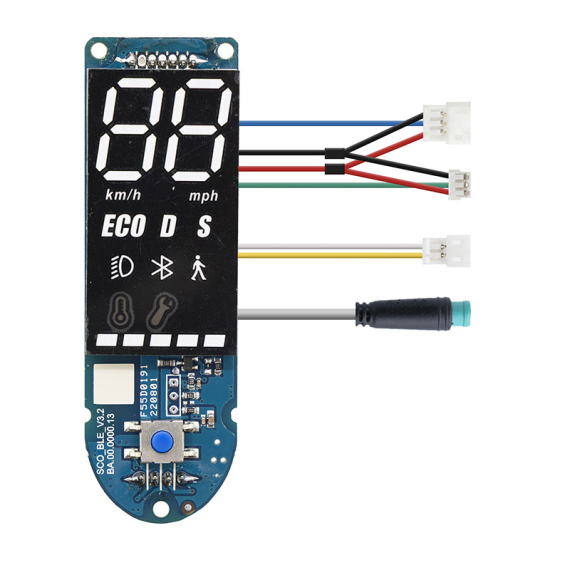
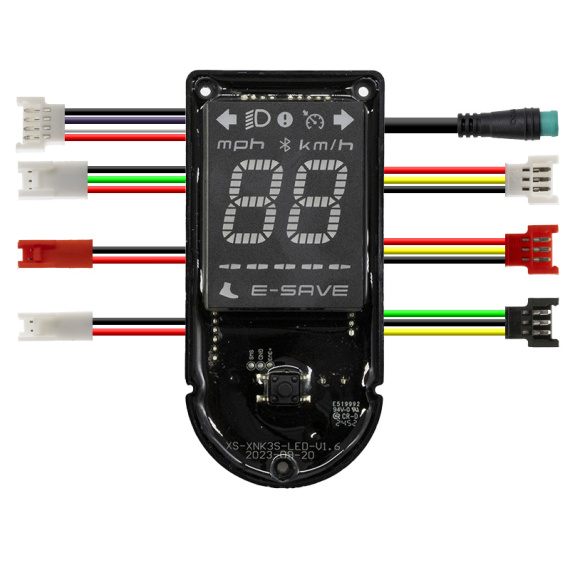
The Display Ninebot F2/F2 Pro is a replacement display screen designed for Ninebot electric scooters. In the event of a damaged, illegible or faulty screen, it provides a clear interface for reading driving information and controlling display functions as before.
Benefits for the user
By replacing a defective display, you restore visibility of essential information during your journeys and improve day-to-day operating comfort. This Ninebot display helps maintain a smooth riding experience, with a usable display and more intuitive control of scooter interface functions.
Technical specifications (available data)
Part type: screen / display module.
Brand: Ninebot.
Categories: Screen / Display, Electronics.
Recommended uses
This display is recommended for repairing or refurbishing an electric scooter when the display no longer functions properly (screen out of order, reading problem, degraded display) or as part of electronic maintenance to restore a functional dashboard.
Compatibility
Compatible with Ninebot F2 and Ninebot F2 Pro models.
Expert advice
Before replacement, accurately identify the model (F2 or F2 Pro) to ensure compatibility. Switch off the scooter's power supply and work carefully on the connectors and wiring harness to avoid damage to pins and cables. After installation, check that the display is working properly and that the information displayed is stable before returning to the road.
![Display Ninebot F2/F2 Pro [Ninebot]](https://doctibike.com/16230-small_default/display-ninebot-f2-f2-pro-ninebot-.jpg)

![Display Xiaomi Mi3 Lite [Original]](https://doctibike.com/18099-medium_default/display-xiaomi-mi3-lite-original-.jpg)
![Pink display with acceleration index to JP 6 [J&P]](https://doctibike.com/16175-medium_default/pink-display-with-acceleration-index-to-jp-6-jp-.jpg)

![Display for Xiaomi Mi3 lite [Ewheel]](https://doctibike.com/18013-medium_default/display-for-xiaomi-mi3-lite-ewheel-.jpg)
![Display screen Xiaomi Mi4 Lite Gen2 (Italian/German version) [ORIGINAL]](https://doctibike.com/16082-medium_default/display-screen-xiaomi-mi4-lite-gen2-italian-german-version-original-.jpg)


![Display Ninebot F2/F2 Pro [Ninebot]](https://doctibike.com/16230-large_default/display-ninebot-f2-f2-pro-ninebot-.jpg "Display Ninebot F2/F2 Pro [Ninebot]")
![Display Ninebot F2/F2 Pro [Ninebot]](https://doctibike.com/16231-large_default/display-ninebot-f2-f2-pro-ninebot-.jpg "Display Ninebot F2/F2 Pro [Ninebot]")
![Display Ninebot F2/F2 Pro [Ninebot]](https://doctibike.com/16232-large_default/display-ninebot-f2-f2-pro-ninebot-.jpg "Display Ninebot F2/F2 Pro [Ninebot]")
![Display Ninebot F2/F2 Pro [Ninebot]](https://doctibike.com/16233-large_default/display-ninebot-f2-f2-pro-ninebot-.jpg "Display Ninebot F2/F2 Pro [Ninebot]")